Command Center · Autonomous Drones · Emergency Response · Design Challenge
FlytBase Sentinel —
Designing the
interface between autonomous
hardware and the operator who must
authorize action.
A wildfire command center that takes an operator from sensor detection
to coordinated response authorization in 90 seconds.
Quick overview — 15 seconds
What it is
A desktop command center for wildfire response
operators managing autonomous drone fleets
The problem
The hardware was fast enough for 90-second
response. The interface wasn't — operators spent 11
minutes manually assembling a picture the system
should have built for them
Core idea
The AI proposes. The operator approves. Three
explicit decisions.
Everything else is carried by the
system.
Key decisions
→
The escalation slider was replaced with explicit
proposal and approval — a gesture is not a
decision
→
Alerts appear over the current map, not on a new
screen — the operator never loses spatial
bearings
→
Authorizing deployment requires a 2-second
press-hold — physical effort that matches the
weight of the action
Role
End-to-end product design
Type
Designathon
Platform
Desktop command center
Year
2025
Checkout the prototype here
The Problem and What Sentinel Does
The hardware could respond in 90 seconds. The missing piece was the
interface sitting between it and the human.
FlytBase builds autonomous drone infrastructure for public safety. Their drones can launch without a
pilot, stream live thermal footage, and coordinate across a fleet without human input. In a wildfire
scenario, getting a drone airborne and feeding live thermal data within 30 seconds of detection was
already technically achievable.
The problem was what happened between the sensor alert and the decision. Operators manually
cross-referenced three disconnected systems — a satellite feed, a sensor dashboard, and a weather
monitor — to assemble a situational picture that the interface should have built for them. That gap
alone added 11 minutes to every response.
48 min
Average detection-to-response time
today
90 sec
Detection to authorized response
handoff with Sentinel
3
Decisions the operator makes in the
entire flow
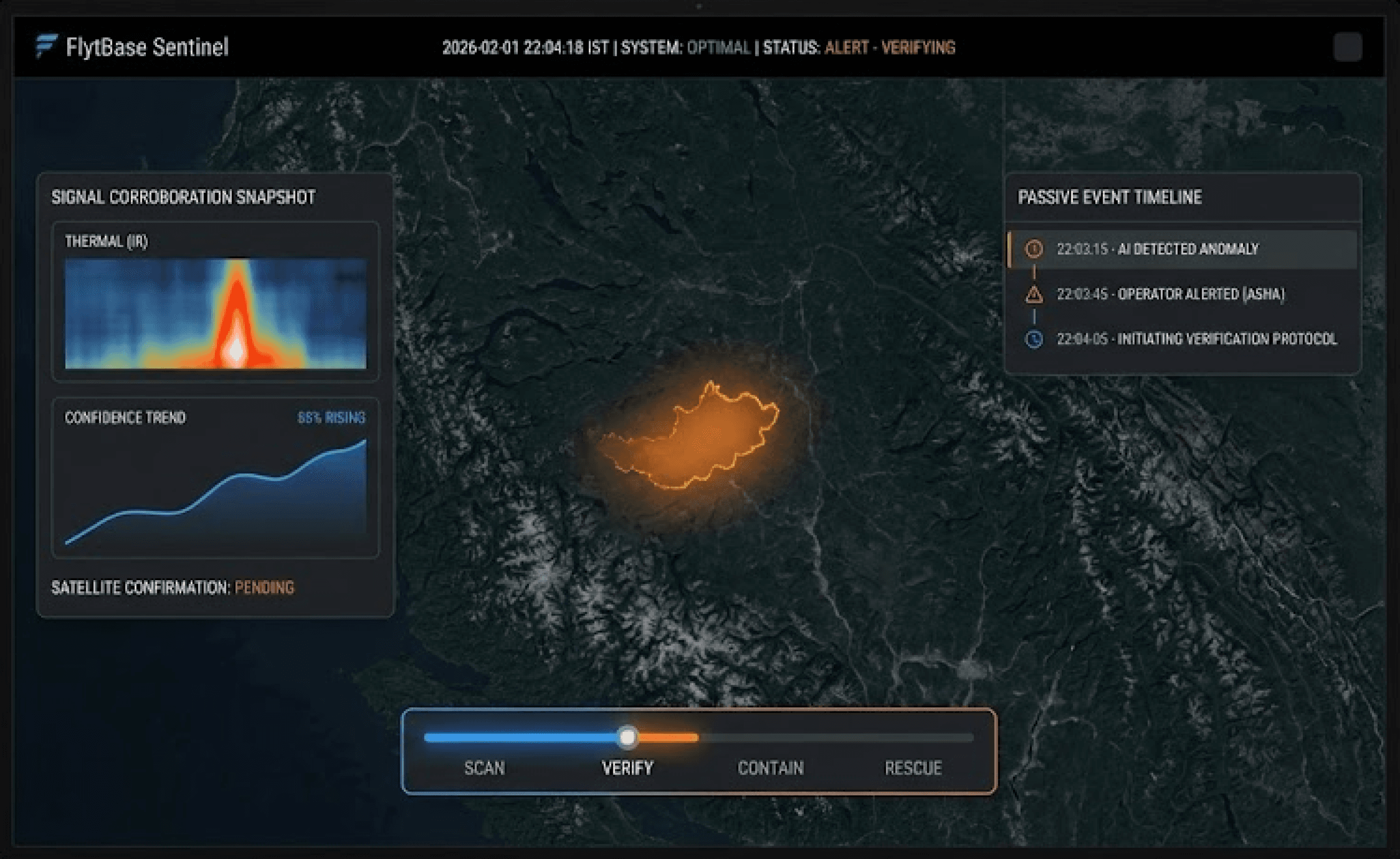
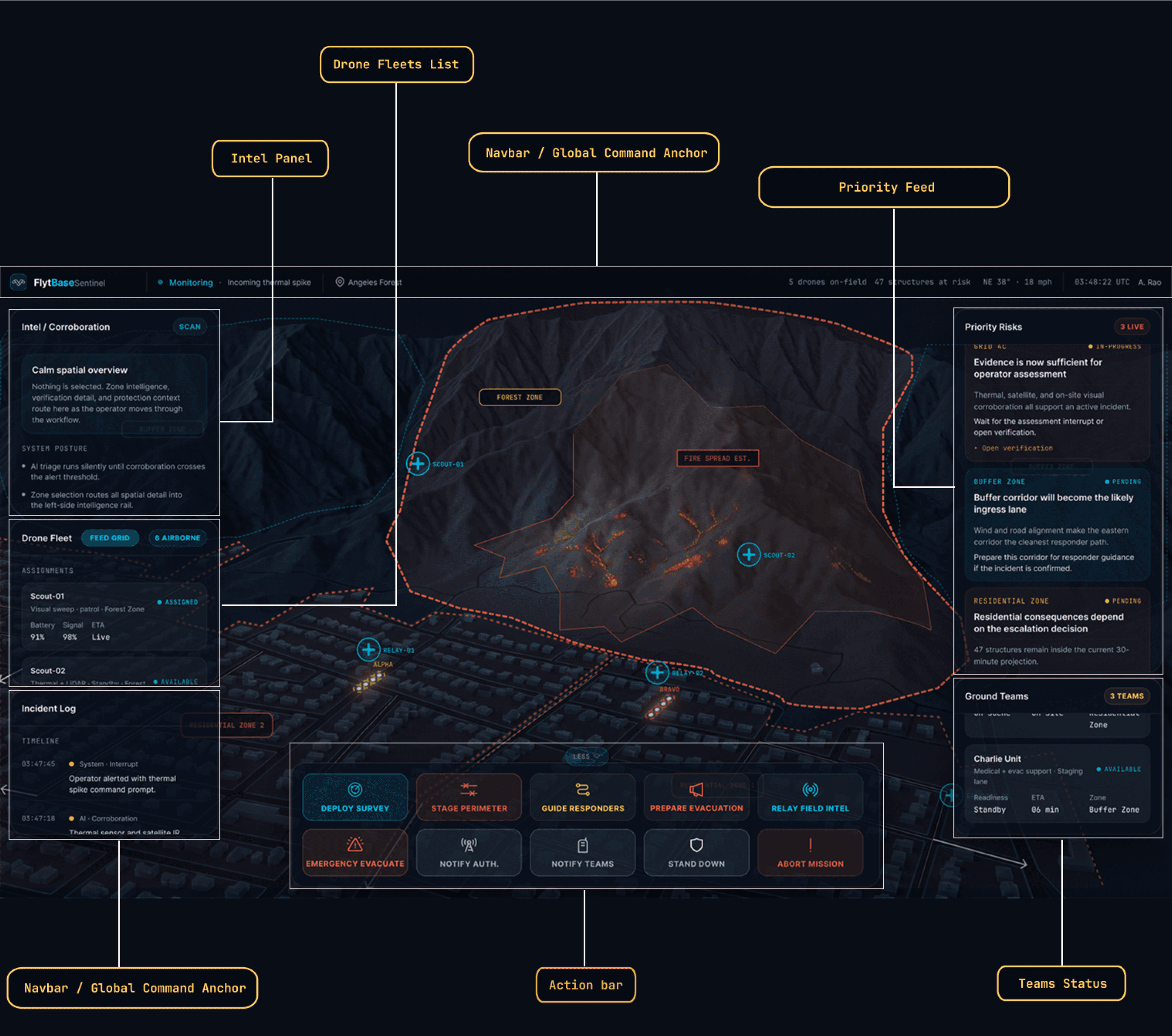
Sentinel absorbs the assembly work. The AI system handles sensor fusion, ignition classification, drone
routing, terrain modeling, and evacuation route generation. It surfaces a pre-built situation summary
and proposes a response plan. The operator reads it and makes three explicit decisions — dispatch,
confirm, authorize. Nothing else is on their plate.
The AI shows its reasoning, not just its output
Instead of a confidence score, the operator sees the
contributing inputs — prior burn history, wind vector,
thermal delta. They have something to push back
on, not just a number to accept.
Progressive density across four phases
The interface layout never changes. The information
contract does — Scan is verbose, Rescue is stripped
to status dots and structure counts. Zero spatial
relearning at peak stress.
Every action is traceable to a person
AI actions log in cyan. Operator actions log in white.
Always visually separated, timestamped,
permanently auditable. No ambiguity about who
made any call.
Designed for failure — not just the clean path
Camera feed lost to smoke, sensors contradicting
each other, mid-decision confidence flip — all four
chaos states are designed with specific, non-
alarming responses.
Where the line is drawn between the system and the operator:
System handles autonomously
—
Sensor fusion and cross-referencing
—
Ignition probability classification
—
Drone routing and dispatch
—
Terrain and fire spread modeling
—
Evacuation route generation
—
Passive audit trail, timestamped
Operator authorizes
✓
Dispatch drone or alert ground team
✓
Confirm active incident or monitor-only
✓
Authorize containment plan (hold 2 seconds)
—
Override any system proposal
—
Handle exceptions the system surfaces
The 90-Second Flow
Four phases. Each one designed around what the operator needs to process at
that moment.
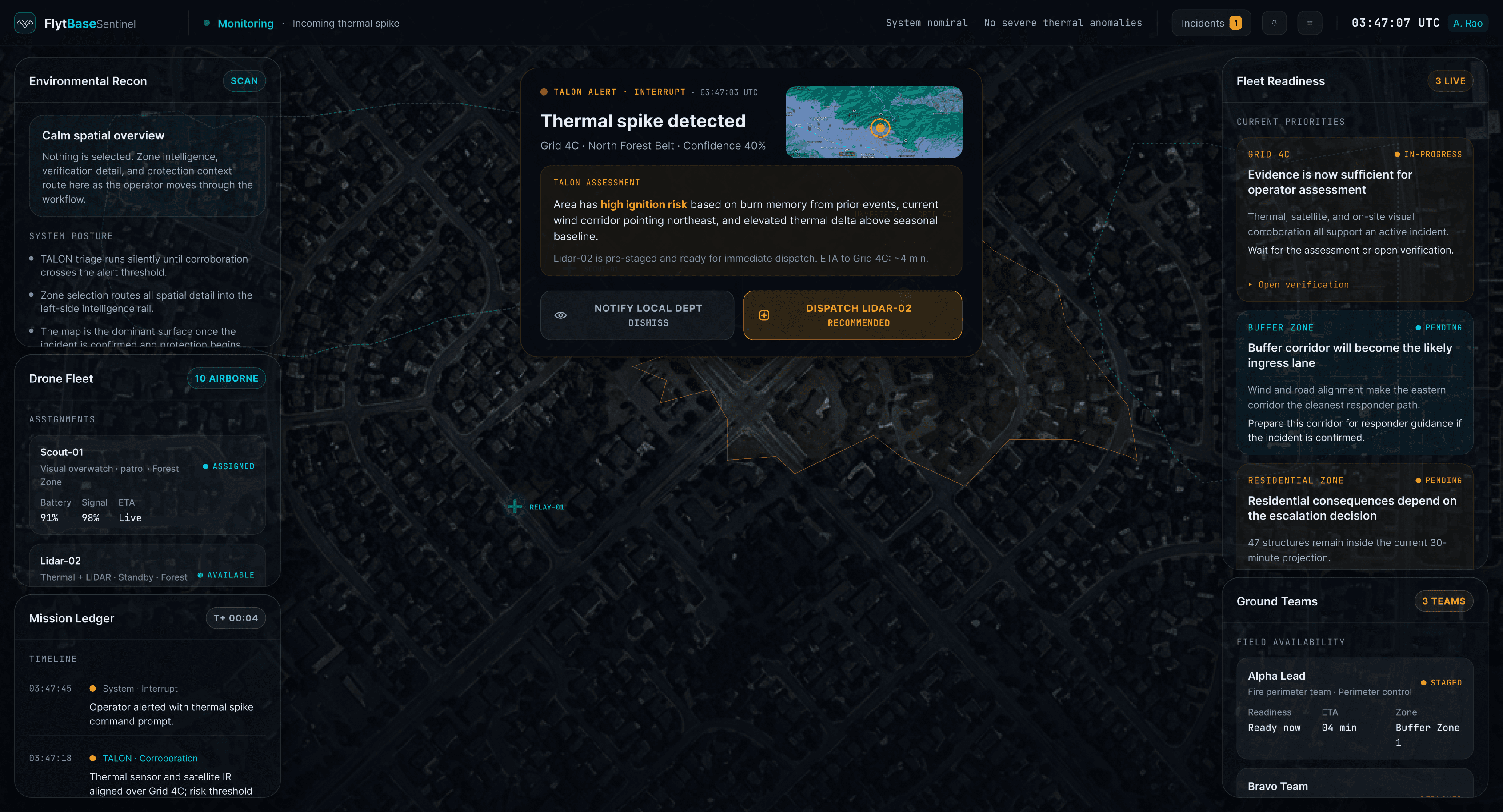
Scan
0 – 15 sec
Alert arrives. Operator reads the situation and makes Decision 1.
System — working
Thermal spike detected at Grid 4C. Cross-references
satellite IR, ground sensors, controlled burn database.
Produces an ignition classification — with the
contributing inputs shown, not just the score.
Operator — decides
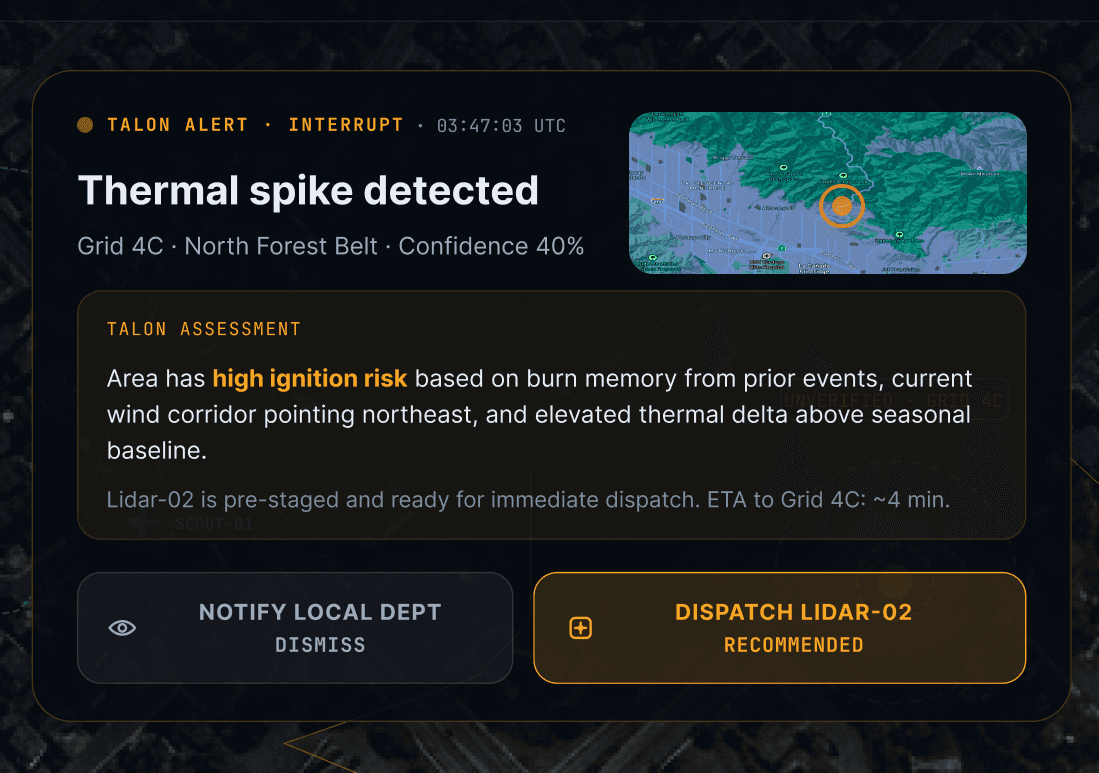
Alert arrives as a
modal over the map already on
screen
— spatial context stays intact. Reads the
classification inputs. Chooses: dispatch drone to
collect evidence, or alert ground team to investigate
on foot.
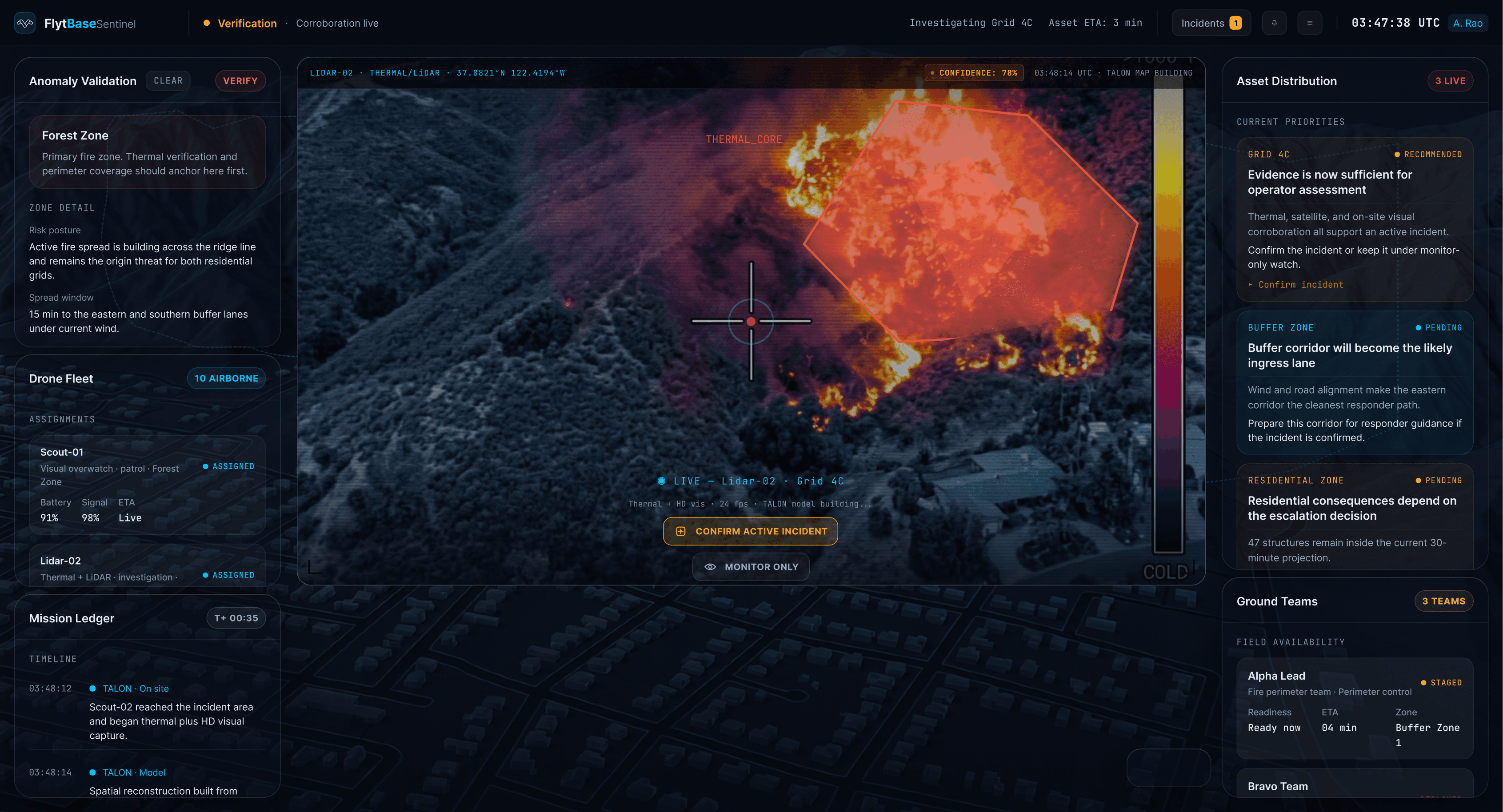
Verify
15 – 45 sec
Drone en route. Operator returns to other zones. System fires a second interrupt
when evidence is ready.
System — collecting
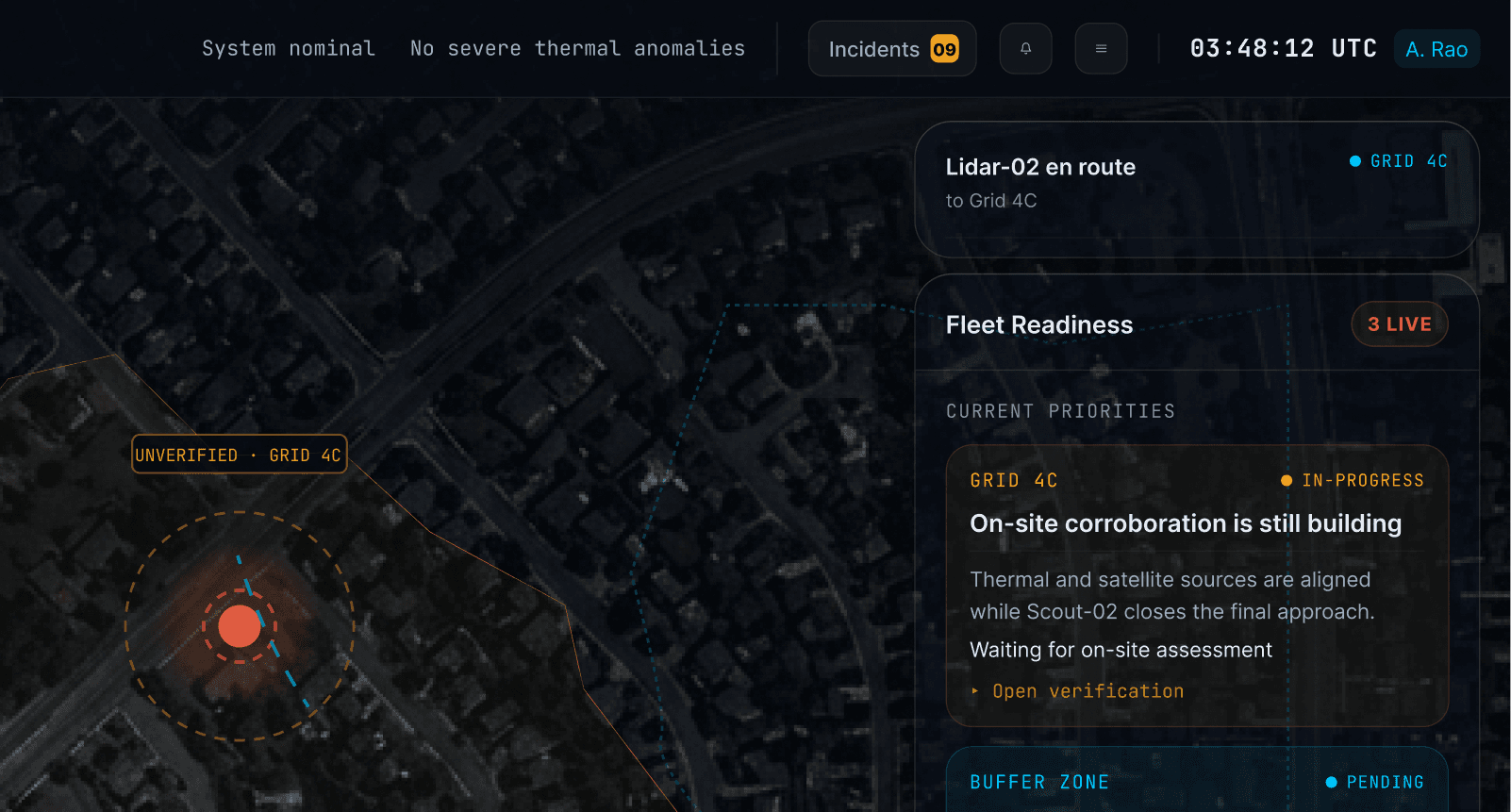
Alert folds into a compact en-route card in the left
panel with a live countdown. Drone visible moving on
the map. System works silently until thermal evidence
crosses threshold.
Operator — decides
Deliberately not interrupted while the drone travels.
Manages other zones normally. Second interrupt fires
when evidence is ready: confirm active incident and
escalate, or mark as monitor-only.
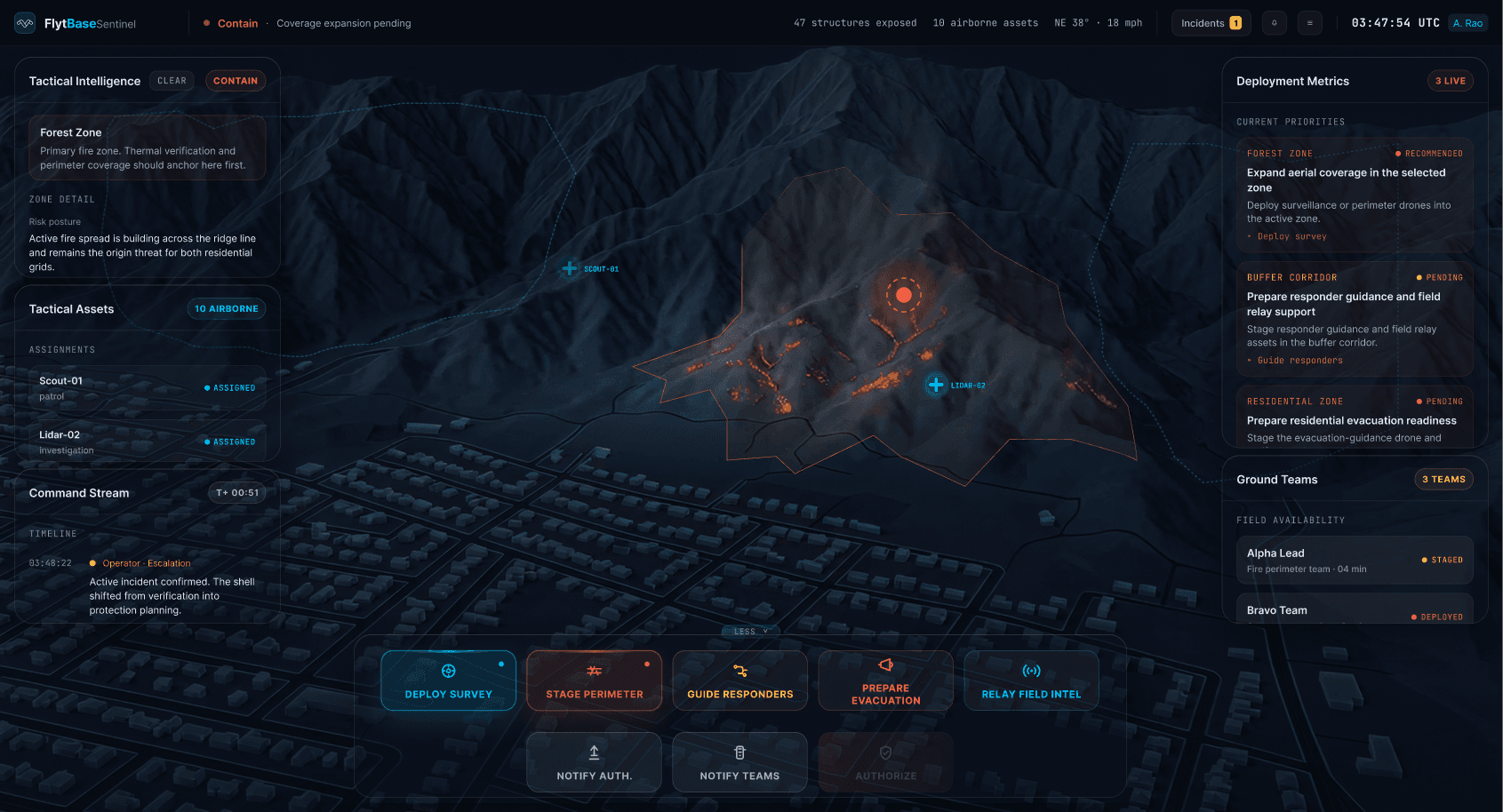
Contain
45 – 75 sec
System proposes a full containment plan. Operator reviews it and physically
authorizes it.
System — proposing
Zone terrain map activates. Drone positions appear
labeled PROPOSED — PENDING AUTHORIZATION.
Ground teams staged per zone. One number shown
large: 47 structures in projected path.
Operator — decides
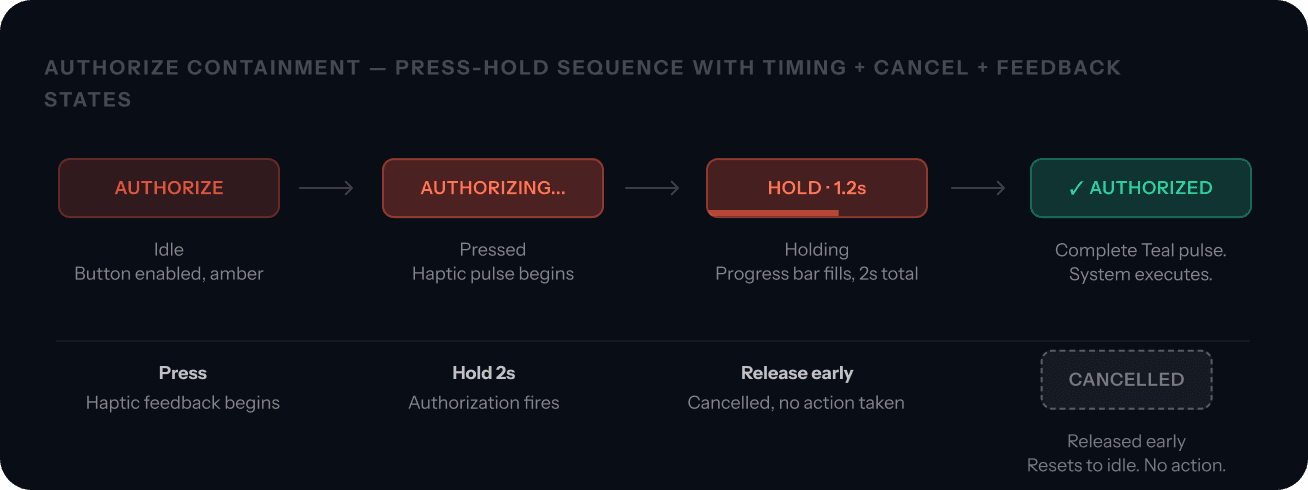
If the plan looks right:
press and hold AUTHORIZE for
2 seconds.
Hold is the decision, not friction —
releasing early cancels with no action taken. Or
override: shift to manual staging and re-authorize.
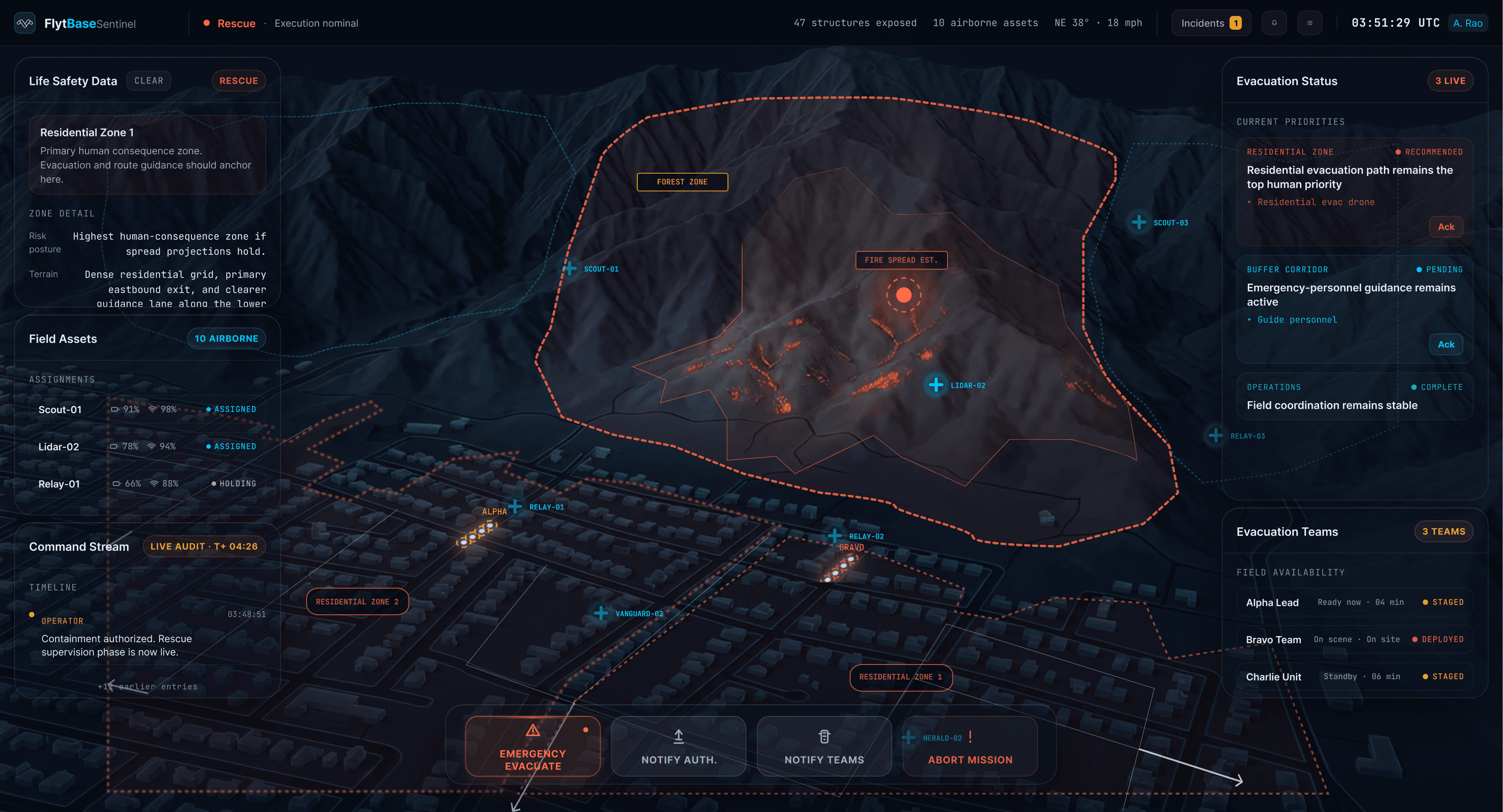
Rescue
75 – 90 sec
System executes. Operator supervises. The absent action button is the signal.
System — executing
Drones go live on the map. Ground teams confirmed
on-scene via tracker. Evacuation routes active. Fire
department ingress guidance routing. Structure
clearance count ticking: 12 of 47.
Operator — supervises
No dominant action button on screen. That is the
signal that the system is executing correctly. Right
panel shows exception feed only — the operator
intervenes when something the system cannot
resolve surfaces.
Key Design Decisions
Three decisions that changed how the operator and the system share
responsibility.
01
Started with a escalation slider then scrapped it
Core pivot
✗ V0.1 — Rejected
One control: drag from Assess to Contain to Rescue.
Each position fires a pre-set AI script. Drones deploy
to positions the operator never reviewed. The audit
trail reads "operator moved slider at 03:48." Nobody
authorized anything.
✓ Final — Chosen
The system proposes a specific plan. The operator
reads it and explicitly approves — every single time,
with no exceptions. A gesture cannot replace a
decision in a system where drones deploy over
residential areas at 3 AM.
Why this mattered
The slider felt like reducing cognitive load — one control, minimum UI. But dragging a handle isn't making a
decision. The operator never reviewed the drone positions it would trigger. Accountability requires a moment of
conscious approval. This became the organizing principle for the entire decision architecture: the system
proposes, the operator authorizes.
02
Alerts appear over the current map, not on a new screen
Spatial context
✗ Rejected
Alert fires, full UI switches to a new screen. Whatever
the operator was watching disappears. Every alert
forces a complete context reset.
✓ Chosen
Alert arrives as a modal layer over the existing map.
The operator's spatial bearings stay intact. After the
decision, the alert folds to a compact card in the left
panel — map remains primary.
Why this mattered
Operators at 3 AM are mid-task — monitoring multiple zones simultaneously. A screen switch on every alert
forces them to re-establish spatial context from scratch each time. The modal preserves the map they were
already reading. Spatial continuity is cognitive budget that can be spent on the decision instead.
Notification
Alert with
confidence %
and reasoning
Alert
ALERT Shifted
onto right panel until data is ready
03
Authorizing deployment requires a 2-second press-hold, not a tap
Commitment design
✗ Rejected
A standard "Are you sure?" confirmation modal. Adds
friction. Under time pressure, operators click through
confirmations without reading them.
✓ Chosen
Press and hold for 2 seconds. The button shows
progress, haptic pulse begins, then fires on
completion. Releasing early cancels with no action
taken.
Why this mattered
A tap feels proportional to sending a message. It does not feel proportional to authorizing drone deployment over
47 occupied homes. Two seconds of sustained physical pressure makes the weight of the decision felt rather than
just confirmed. The hold replaces a modal with a physical commitment that cannot be dismissed on reflex.
Honest Reflection
What is a design estimate. Why the human gate is deliberate, not a
compromise.
What needs validation
The 90-second target is design-estimated, not
measured. I ran through the flow myself. I am not a
trained dispatcher under operational pressure.
Whether this holds under field conditions is what
controlled testing with actual operators would close
— and I said that in the case study rather than
presenting the estimate as validated data.
Why full autonomy was not the answer
Full autonomy would be faster. It would also mean
drones deploying over residential areas at 3 AM
based on a sensor that might be a controlled burn.
FAA airspace rules, liability law, and emergency
response protocols do not accommodate "the AI
decided." The human gate is not friction added by a
cautious designer. It is what makes this system legally
operable.
I started designing screens. I ended up thinking about decision-making systems.
Those are not the same thing — and every section of this case study is the moment I
noticed the difference.
The full case study documents every layer of reasoning
All four chaos states (blind drone, contradicting sensors, mid-decision
confidence flip, compound failure), the complete interactive 90-second
walkthrough, map design rationale — 3D terrain vs 2D vector layer, the full
iteration history from slider to decision architecture, and six design decisions
with before/after.
Full case study